Quick answer
Use the horn to start a Wave, the bottom build tabs to choose what to build, and the bottom-right card to inspect your selection. In our demo run (v0.19.4e), the tutorial lists WASD for the camera, Space to pause, and X / C / V for normal / double / triple speed.
On this page
Where are the main HUD controls?
The menu and seed are at top left, the horn is at top centre, speed controls are at top right, and the selected-unit card is at bottom right.
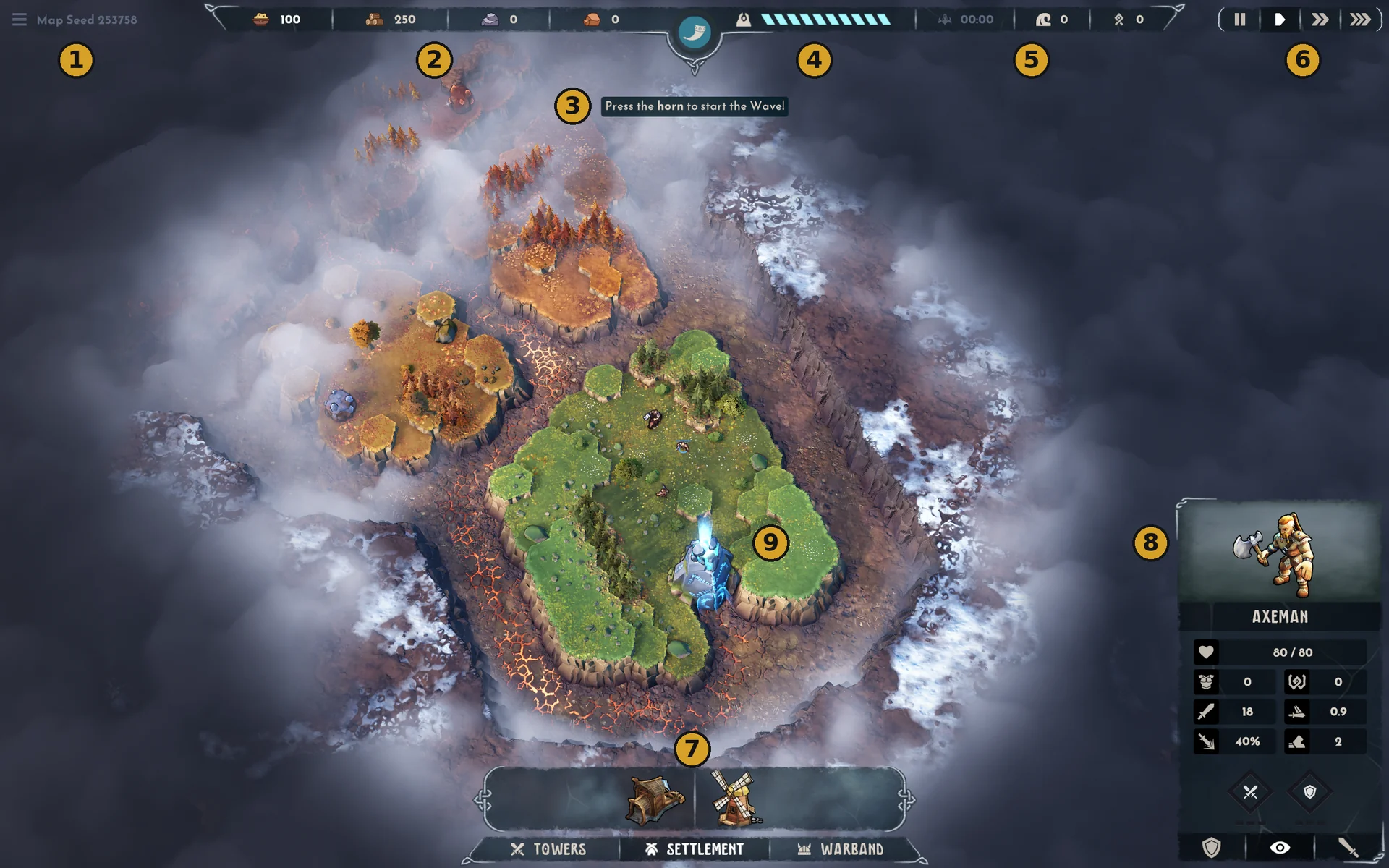
- Menu and map seed: top-left menu icon and “Map Seed 253758”, the seed number shown in our demo run (v0.19.4e).
- Resource bar: Food 100, Wood 250, Stone 0 and Iron 0, the starting stock seen in our demo run (v0.19.4e). See Resources and economy.
- Horn: the top-centre horn button sits above the prompt “Press the horn to start the Wave!”.
- Striped bar: an icon followed by a long striped bar. The tutorial says the status bar shows the Spiridun’s Health; this appears to be that bar (unconfirmed).
- Timer and counters: a greyed timer reads 00:00, followed by a wave-shaped icon with 0 (meaning unconfirmed) and a rune-shaped icon with 0 (meaning unconfirmed). The tutorial says the status bar includes a Wave counter.
- Speed controls: top-right pause, play, double-speed and triple-speed buttons. The TIME CONTROL tutorial lists Space to pause and X, C, V for normal, double and triple speed.
- Build bar: TOWERS, SETTLEMENT and WARBAND tabs. SETTLEMENT is open and shows two building icons, one a windmill.
- Selected-unit card: the bottom-right Axeman card shows Health 80/80 and other readings, with stance buttons.
- Spiridun: your base glows in the centre of the starting island.
Which controls does the tutorial explain?
The tutorial explains camera movement, selection, path indicators, the status bar and time control.
In our demo run (v0.19.4e), the tutorial gives these controls and cues:
- Camera: move with WASD or the screen edges; use the mouse wheel to zoom and hold it to rotate.
- Selection: left-click to select; the context menu appears at bottom right.
- Path indicators: the orange magma trail shows where enemies approach.
- Status bar: the strategy phase is blue and the Wave phase is red. Press the horn during the strategy phase to start the next Wave immediately.
- Time control: Space pauses; X / C / V select normal / double / triple speed.
What happens if your Hero dies?
In our demo run (v0.19.4e), the HERO SLAIN tutorial says the Hero takes 210 seconds to return. HERO RESPAWNED says the Hero is awaiting commands at the Spiridun. See Hero (Hogvald) for the exact tutorial messages and card readings.
About this data
The annotated map and tutorial captures are from the site owner in our demo run (v0.19.4e). The numbered callouts identify visible controls; the striped bar and two counter meanings remain unconfirmed. The displayed seed and starting stock describe this capture. The card values do not establish universal base stats or a full-release interface.
These guides distinguish official information from editorial advice. Source links sit beside the claims they support. Read our editorial policy.
Official pages: Steam store page · Demo on Steam.